CSAPP:LinkerLab #
CSAPP material on linking will also go here……
Most figures in this post come from the English edition of CSAPP.
Linking Mechanics in Detail #
How detailed? Hard to define — it depends on the reader’s prior understanding. Linking looks like simple packaging, but the underlying ideas are complex and widely applicable.
Compiler Driver #
A static linking pipeline:
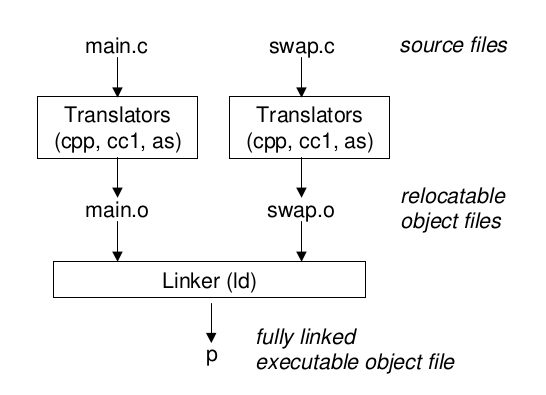
Static Linking #
ld is the static linker: it takes .o files as input and produces an executable.
-
Symbol resolution
-
Relocation
Object Files #
-
Relocatable
-
Executable
-
Shared (can be dynamically loaded into memory and linked)
Relocatable Object Files #
Meaning: as an object file, it can be relocated.
Many people initially confuse .o and ELF: ELF is a format.
Contents:
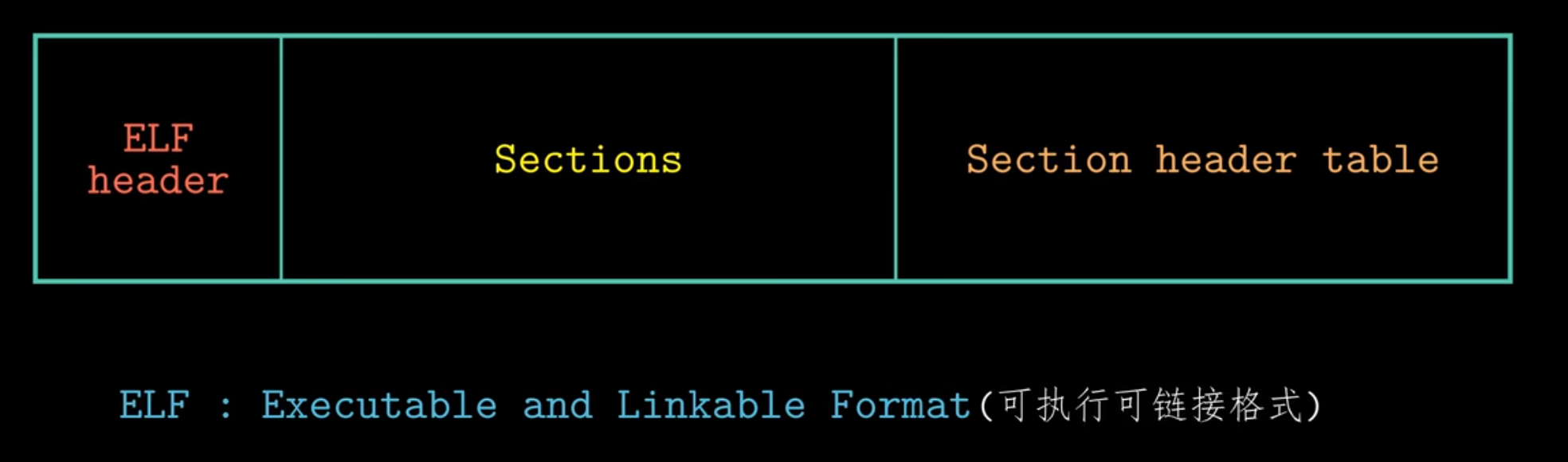
-
ELF stands for Executable and Linkable Format
-
It is the common object-file format on Linux (Windows uses PE)
-
An ELF file can be:
- Relocatable Object File →
.o - Executable File → e.g., a program produced by linking
- Shared Object File →
.so - Core Dump → a debug dump generated when a program crashes
- Relocatable Object File →
-
A
.ofile is produced from a.cfile by the compiler (e.g.,gcc -c) -
The
.oformat is an ELF relocatable object file -
It usually does not contain a standalone
main()ready to run; it must be linked into an executable
A typical layout:
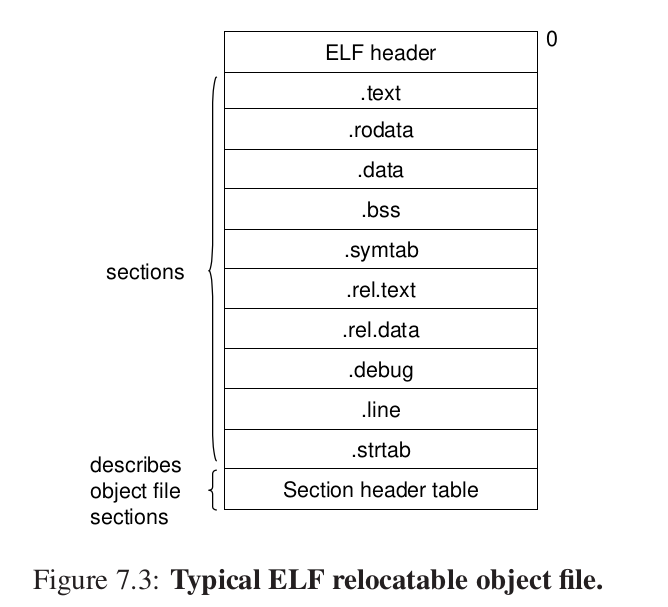
.text: machine code
.rodata: read-only data
.data: initialized global/static variables
.bss: uninitialized or zero-initialized globals/statics (better save space (?))
.symtab: symbol table — information about functions and globals
We use readelf to inspect the header and analyze it:
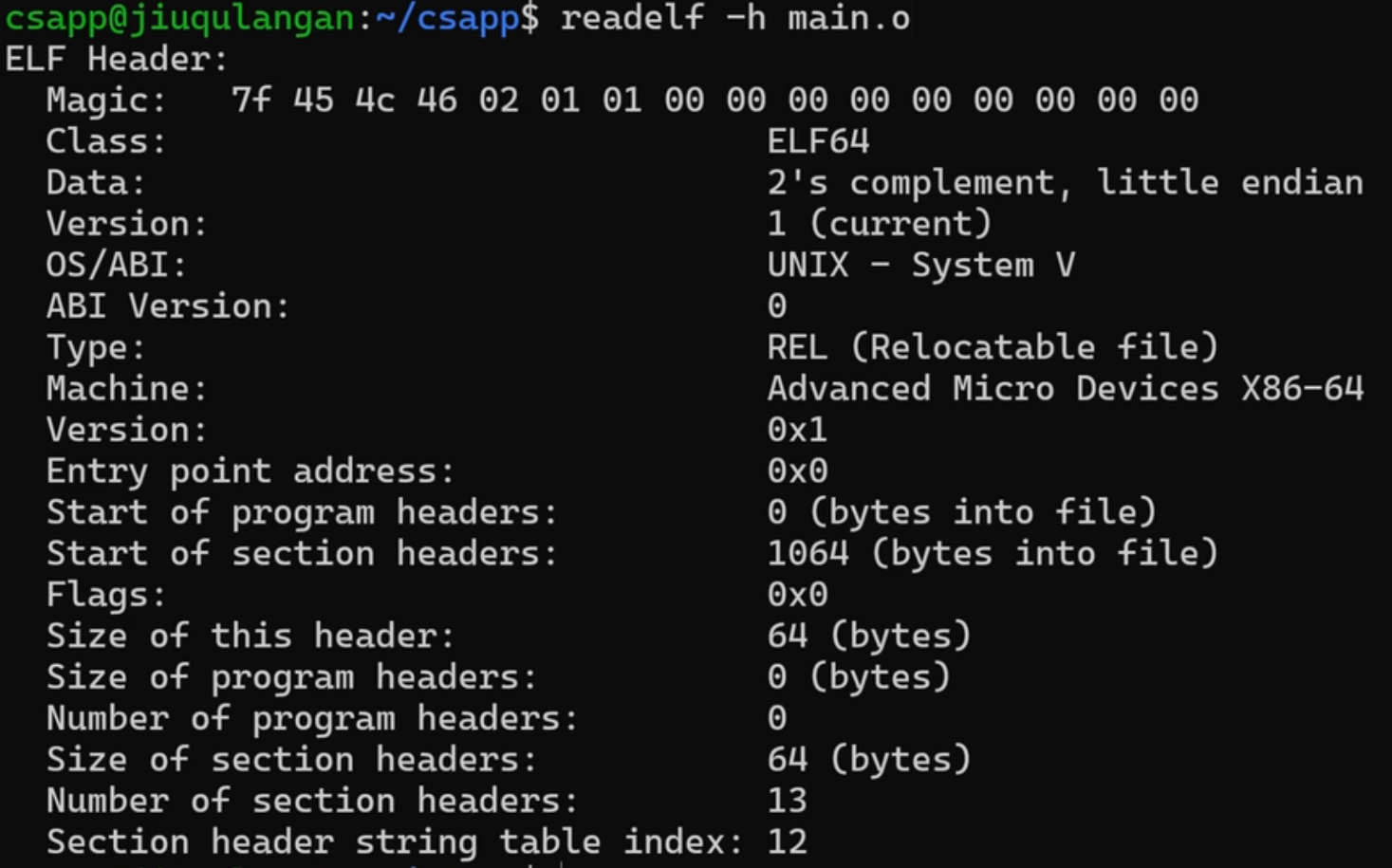
What is a Magic Number: it identifies this relocatable object file:
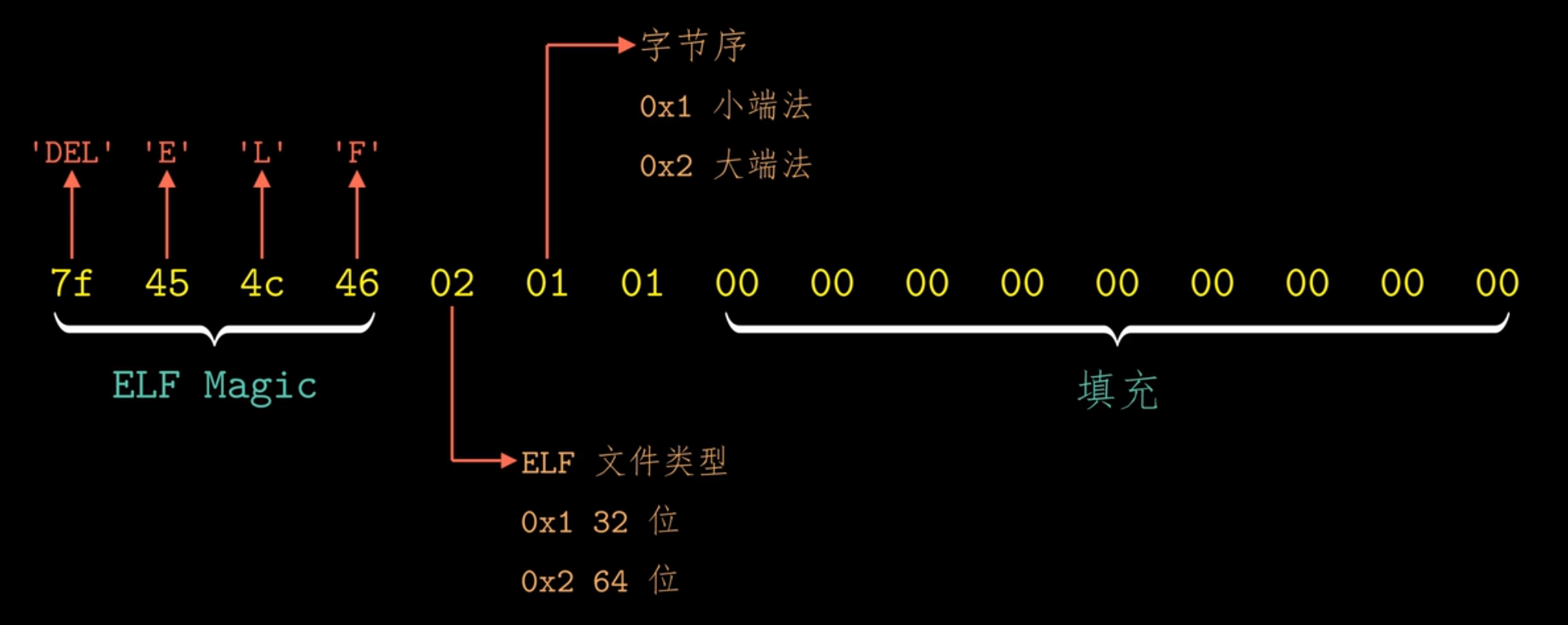
From the information above, we get:
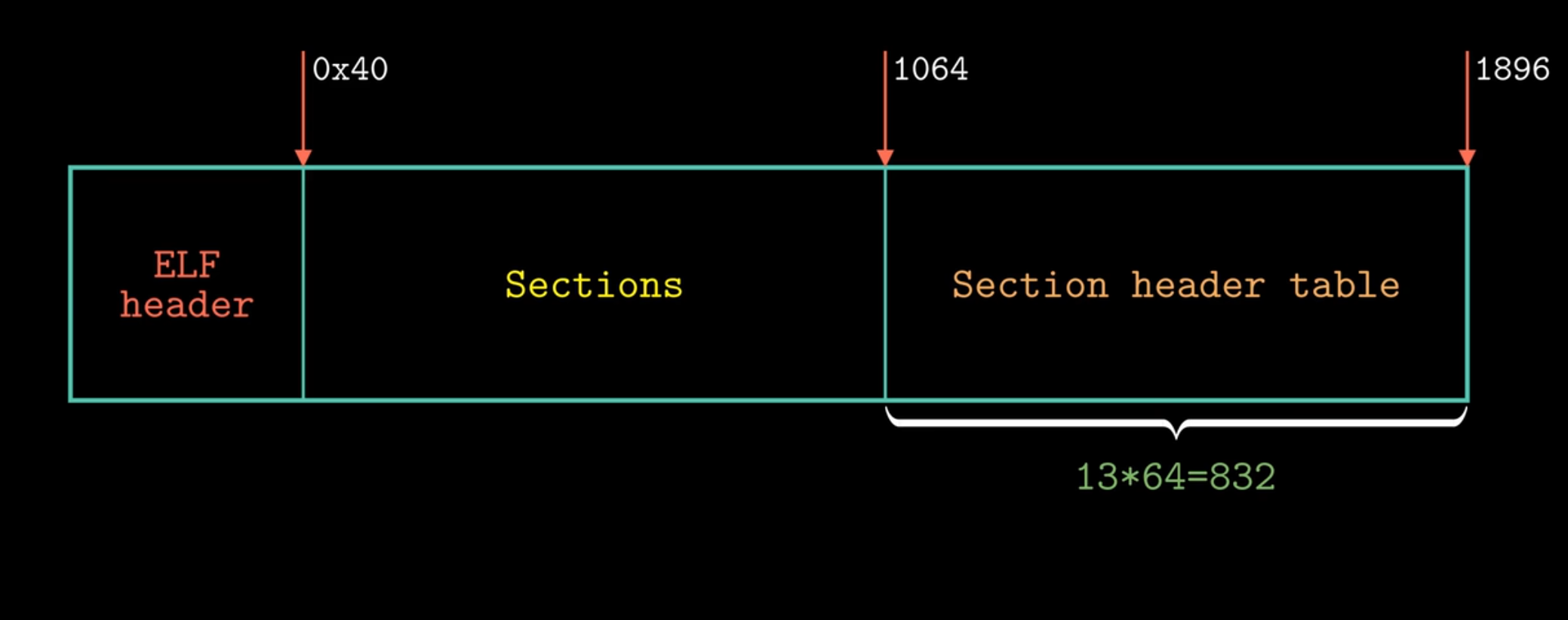
And what sections store:
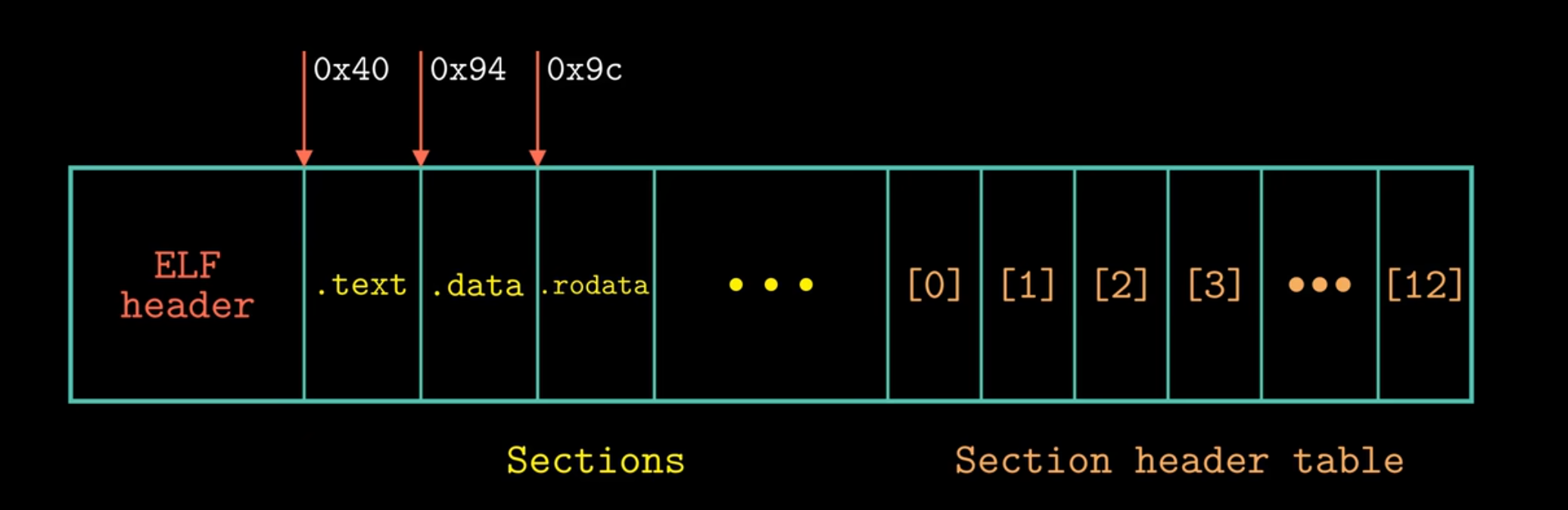
As mentioned above.
Symbols and the Symbol Table #
The *symbol table is the key topic.
Each relocatable module m has a symbol table, stored in a section.
-
Global symbols: non-static C functions and global variables that I define.
-
External symbols: non-static C functions and global variables defined elsewhere.
-
Local symbols: my
staticfunctions and locals (.symtabdoes not care about stack locals) — managed on the stack.
So in multi-file C programming, using
staticto protect your own functions and variables is good practice.They will not be referenced by others (I was here first!!!).
Symbol-table entries:
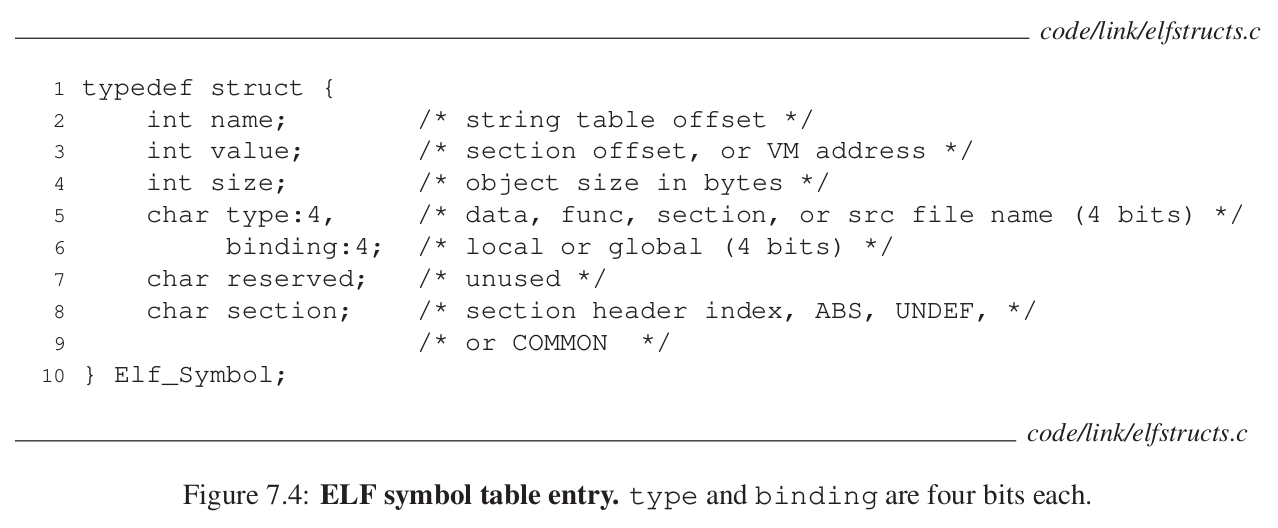
Each field is assigned to some section of the object file.
Inspect object files with readelf
| Option | Meaning |
|---|---|
-h |
Show ELF file header |
|---|---|
-S |
Show section headers |
|---|---|
-s |
Show symbol table |
|---|---|
-r |
Show relocation info |
|---|---|
-l |
Show program headers |
|---|---|
-x <section> |
Hex dump of a section |
|---|---|
-a |
Show everything (union of the options) |
|---|---|
main.c
int sum(int *a, int n);

int array[2] = {1, 2};

int main()
{
    int val = sum(array, 2);
    return val;
}
sum.c
int sum(int *a, int n)
{
    int i, s = 0;
    for (i = 0; i < n; i++)
    {
        s += a[i];
    }
    return s;
}
$readelf -s main.o
Symbol table '.symtab' contains 6 entries:
   Num:    Value          Size Type    Bind   Vis      Ndx Name
     0: 0000000000000000     0 NOTYPE  LOCAL  DEFAULT  UND
     1: 0000000000000000     0 FILE    LOCAL  DEFAULT  ABS main.c
     2: 0000000000000000     0 SECTION LOCAL  DEFAULT    1 .text
     3: 0000000000000000     8 OBJECT  GLOBAL DEFAULT    3 array
     4: 0000000000000000    40 FUNC    GLOBAL DEFAULT    1 main
     5: 0000000000000000     0 NOTYPE  GLOBAL DEFAULT  UND sum
A bit confusing — be sure to work the end-of-chapter exercises for deeper understanding.
Symbol Resolution #
How does the linker work?
Scan the symbol table of each input file.
Multiply defined global symbols? #
Global → strong / weak
Strong symbols: functions and initialized global variables
Weak symbols: uninitialized global variables
Rules:
-
Strong symbols must not collide
-
One strong + many weak → choose the strong
-
Multiple weak → choose arbitrarily (2 and 3 are both risky)
-fno-common: treat multiply defined globals as hard errors — safer.
This part is relatively easy to understand.
Linking with static libraries? #
A static library is stored on disk as an archive and can be viewed as a collection of relocatable object files. When our code references the library:
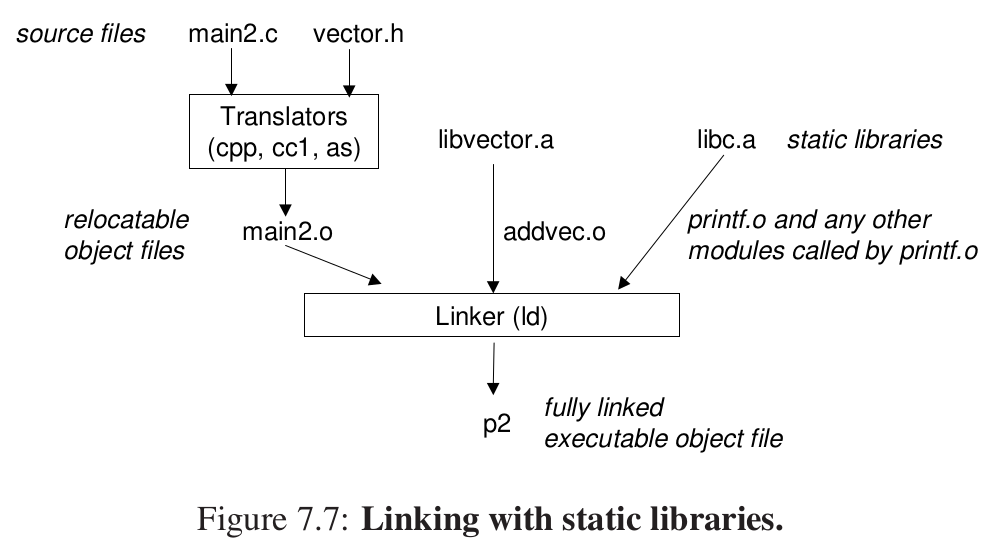
When you reference addvec, addvec.o is copied into the executable.
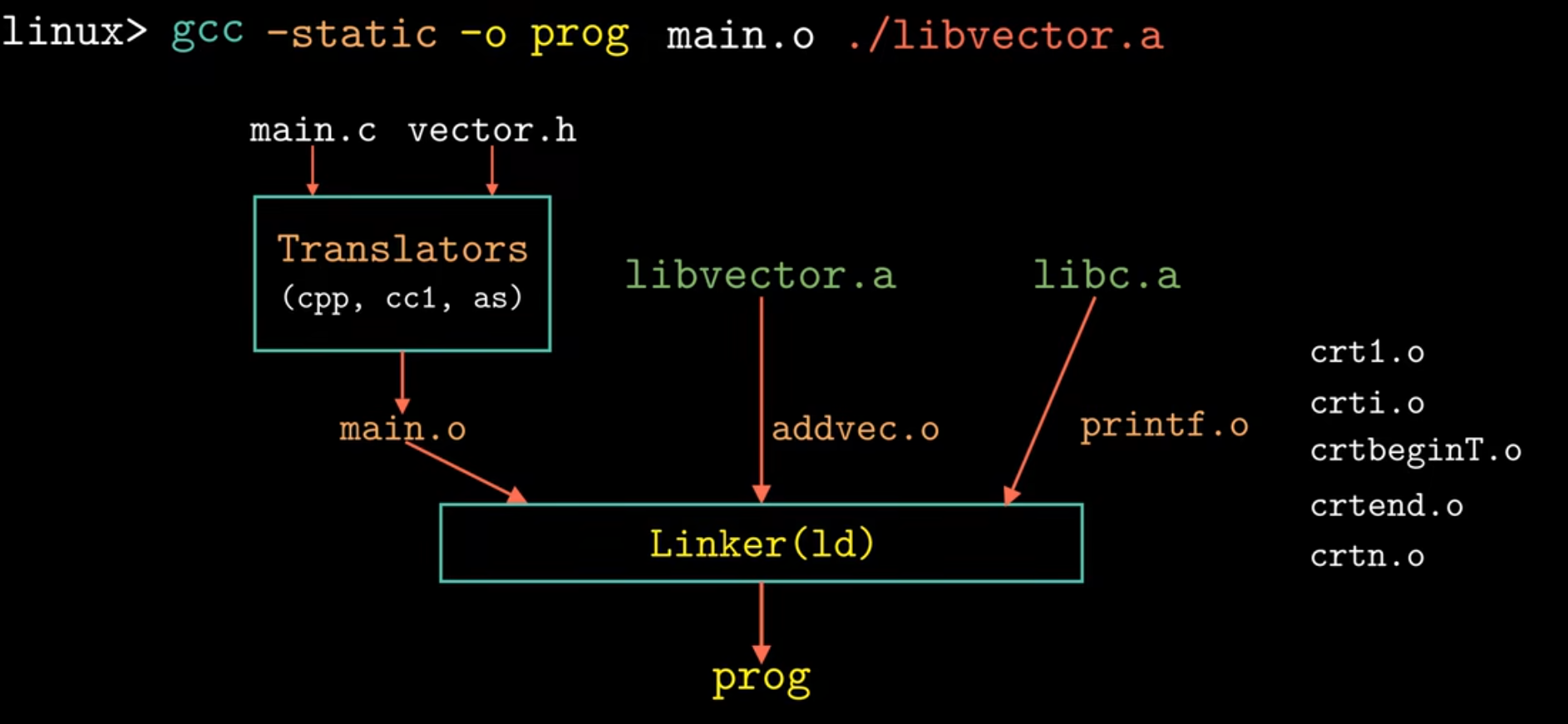
How are references resolved against static libraries? #
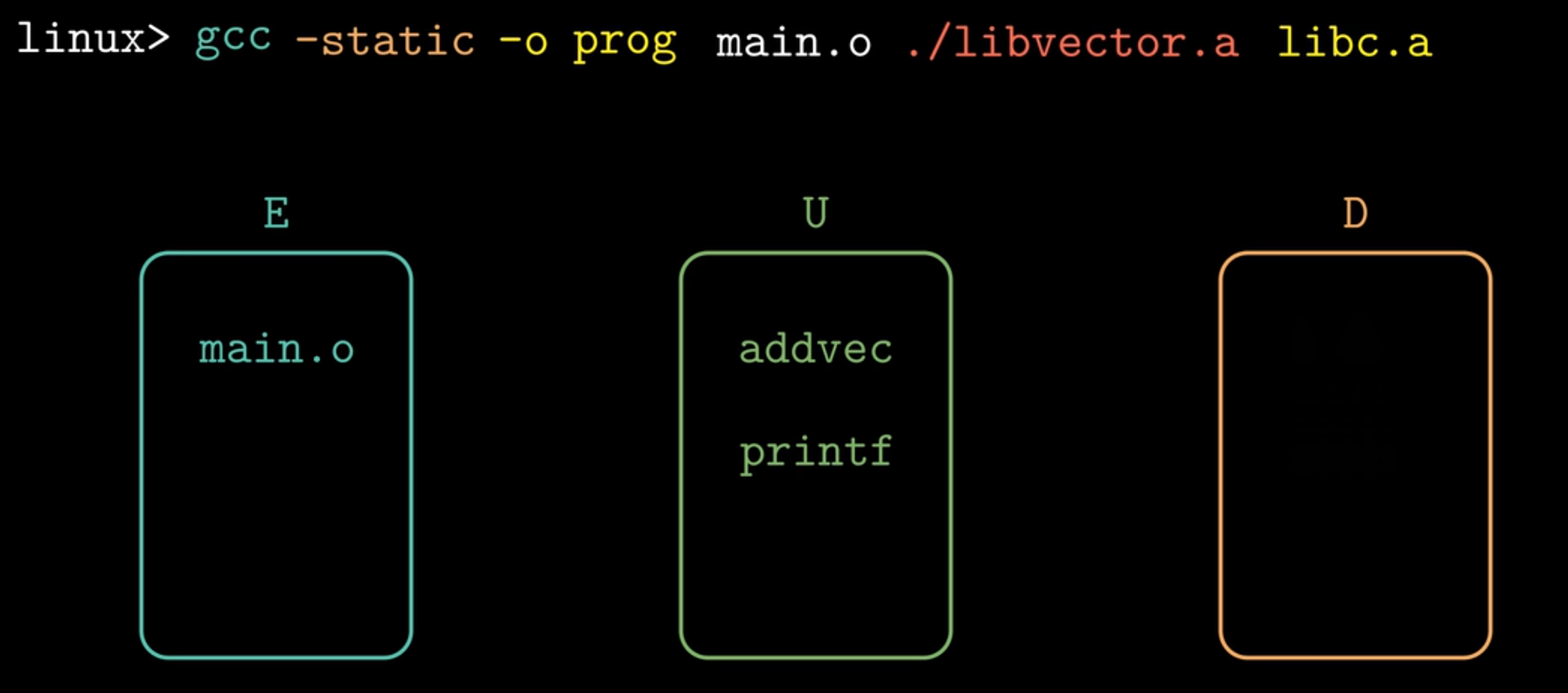
For a one-line compile command, the linker scans left to right and maintains three sets:
-
E: set of relocatable object files to include
-
U: set of unresolved symbols
-
D: set of symbols already defined by files seen so far
Process:
-
While scanning, if
fis an object file, put it in E and update U and D (symbols you define go into D; symbols referenced from a static library go into U). -
If
fis an archive, compare archive members against U; if a member defines a needed symbol, pull it in and move that symbol into D. -
When the linker finishes, if
|U| != 0, error and abort.
unix> gcc -static ./libvector.a main2.c
/tmp/cc9XH6Rp.o: In function ‘main’:
/tmp/cc9XH6Rp.o(.text+0x18): undefined reference to ‘addvec’
Consider putting the static library first: the linker compares archive members against U early, but U is empty then. When main.c is scanned later, references into the library become undefined.
So put libraries last, and order them by inter-library dependencies (topological order).
For more tangled dependencies, you can repeat libraries on the command line (see the exercises).
Process as in the figure:
Relocation #
In short: rewrite addresses.
Merge input modules and assign runtime addresses to each symbol.
- Relocate sections and symbol definitions
e.g., merge all .data sections into one and assign addresses.
- Relocate symbol references in sections
Modify references so they point at the correct runtime addresses.
Relocation Entries #
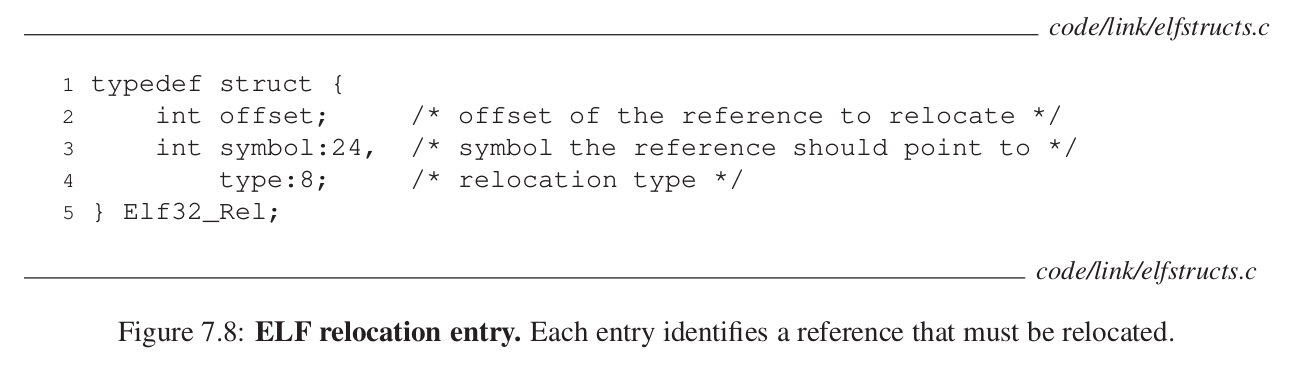
When the assembler produces an object module, it emits .rel.data / .rel.text relocation entries.
Relocating Symbol References #
The relocation algorithm walks each section and each entry:
foreach section s {
foreach relocation entry r {
	refptr = s + r.offset; /* ptr to reference to be relocated */
	/* relocate a PC-relative reference */
    //相对地址
	if (r.type == R_386_PC32) {
	refaddr = ADDR(s) + r.offset; /* ref’s runtime address */
	*refptr = (unsigned) (ADDR(r.symbol) + *refptr - refaddr);
	}
    //绝对地址
	/* relocate an absolute reference */
	if (r.type == R_386_32){
	*refptr = (unsigned) (ADDR(r.symbol) + *refptr);
	}
}
}
For the main.o above, run
objdump -dx main.o
Disassembly of section .text:

0000000000000000 <main>:
   0:   f3 0f 1e fa             endbr64
   4:   55                      push   %rbp
   5:   48 89 e5                mov    %rsp,%rbp
   8:   48 83 ec 10             sub    $0x10,%rsp
   c:   be 02 00 00 00          mov    $0x2,%esi
  11:   48 8d 05 00 00 00 00    lea    0x0(%rip),%rax        # 18 <main+0x18>
                        14: R_X86_64_PC32       array-0x4
  18:   48 89 c7                mov    %rax,%rdi
  1b:   e8 00 00 00 00          call   20 <main+0x20>
                        1c: R_X86_64_PLT32      sum-0x4
  20:   89 45 fc                mov    %eax,-0x4(%rbp)
  23:   8b 45 fc                mov    -0x4(%rbp),%eax
  26:   c9                      leave
  27:   c3                      ret
This is the actual output on my machine; both array and sum are PC-relative relocations.
Relocating PC-Relative References #
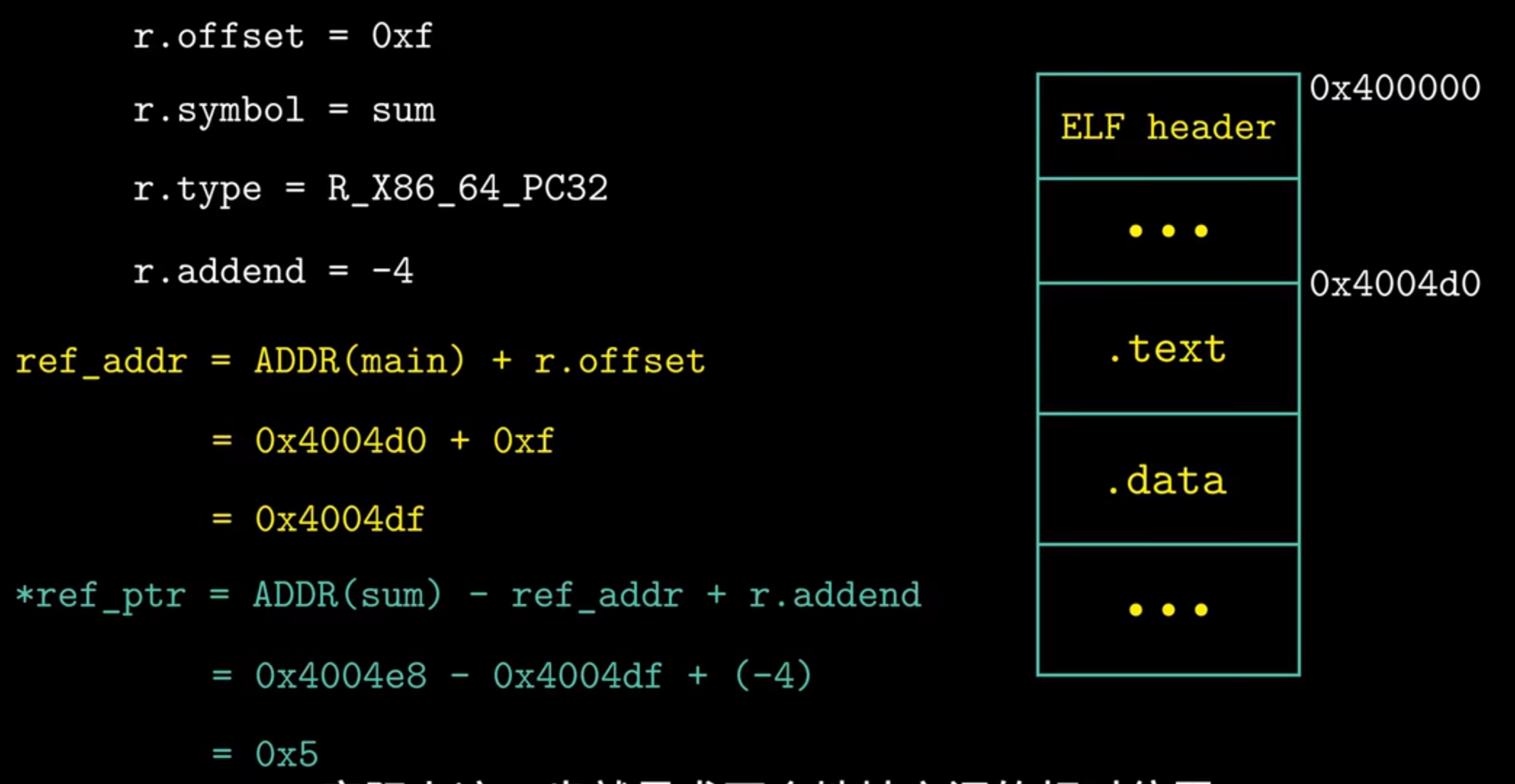
1b: e8 00 00 00 00 call 20 <main+0x20>
Look at this line: e8 is the call opcode; the following 00 00 00 00 are placeholders for a PC-relative displacement.
During relocation, the algorithm above fills in sum’s offset relative to main so we can call sum.
Finding the relative distance between two addresses:
Relocating Absolute References #
Compute and patch directly in the object/executable.
After relocation:
0000000000001129 <main>:
    1129:       f3 0f 1e fa             endbr64
    112d:       48 83 ec 08             sub    $0x8,%rsp
    1131:       be 02 00 00 00          mov    $0x2,%esi
    1136:       48 8d 3d d3 2e 00 00    lea    0x2ed3(%rip),%rdi        # 4010 <array>
    113d:       e8 05 00 00 00          call   1147 <sum>
    1142:       48 83 c4 08             add    $0x8,%rsp
    1146:       c3                      ret

0000000000001147 <sum>:
    1147:       f3 0f 1e fa             endbr64
    114b:       ba 00 00 00 00          mov    $0x0,%edx
    1150:       b8 00 00 00 00          mov    $0x0,%eax
    1155:       eb 09                   jmp    1160 <sum+0x19>
    1157:       48 63 c8                movslq %eax,%rcx
    115a:       03 14 8f                add    (%rdi,%rcx,4),%edx
    115d:       83 c0 01                add    $0x1,%eax
    1160:       39 f0                   cmp    %esi,%eax
    1162:       7c f3                   jl     1157 <sum+0x10>
    1164:       89 d0                   mov    %edx,%eax
    1166:       c3                      ret
In main, the site at 113e is the relocated address for sum.
The value 5 is the relocation result: when the CPU executes call, PC already points at the next instruction 1142; to run the call, the CPU pushes PC and does PC += 5, so PC = 1147, landing in sum.
This matches how call works: when the linker links the two modules, it uses the relocation table to replace the placeholder after e8 with the callee’s offset relative to the current PC; call pushes PC, adds the offset, and continues at the target.
Executable Object Files #
We have now produced this:
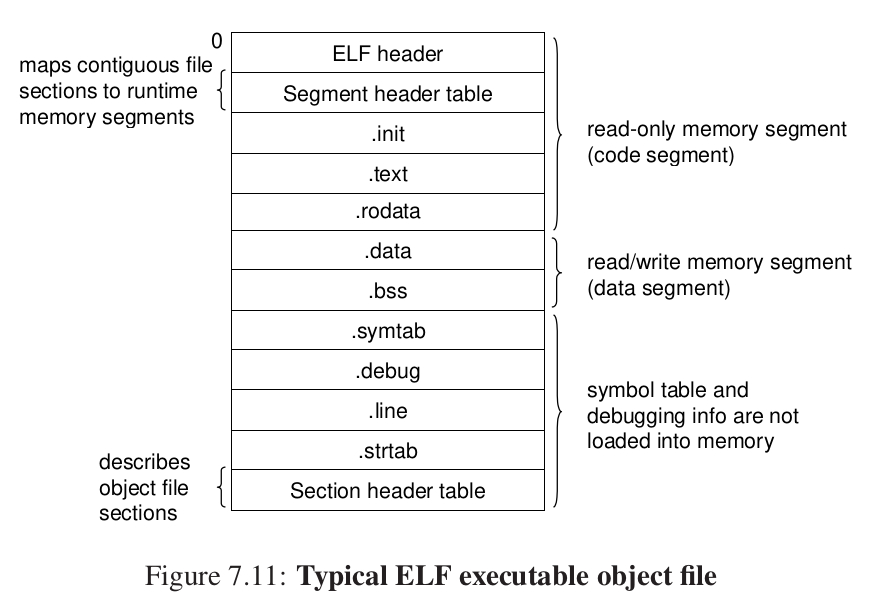
This is a typical layout.
Inspect the program headers of the a.out above.
Program Header:
    PHDR off    0x0000000000000040 vaddr 0x0000000000000040 paddr 0x0000000000000040 align 2**3
         filesz 0x00000000000002d8 memsz 0x00000000000002d8 flags r--
  INTERP off    0x0000000000000318 vaddr 0x0000000000000318 paddr 0x0000000000000318 align 2**0
         filesz 0x000000000000001c memsz 0x000000000000001c flags r--
    LOAD off    0x0000000000000000 vaddr 0x0000000000000000 paddr 0x0000000000000000 align 2**12
         filesz 0x00000000000005f0 memsz 0x00000000000005f0 flags r--
    LOAD off    0x0000000000001000 vaddr 0x0000000000001000 paddr 0x0000000000001000 align 2**12
         filesz 0x0000000000000175 memsz 0x0000000000000175 flags r-x
    LOAD off    0x0000000000002000 vaddr 0x0000000000002000 paddr 0x0000000000002000 align 2**12
         filesz 0x00000000000000d8 memsz 0x00000000000000d8 flags r--
    LOAD off    0x0000000000002df0 vaddr 0x0000000000003df0 paddr 0x0000000000003df0 align 2**12
         filesz 0x0000000000000228 memsz 0x0000000000000230 flags rw-
 DYNAMIC off    0x0000000000002e00 vaddr 0x0000000000003e00 paddr 0x0000000000003e00 align 2**3
         filesz 0x00000000000001c0 memsz 0x00000000000001c0 flags rw-
    NOTE off    0x0000000000000338 vaddr 0x0000000000000338 paddr 0x0000000000000338 align 2**3
         filesz 0x0000000000000030 memsz 0x0000000000000030 flags r--
    NOTE off    0x0000000000000368 vaddr 0x0000000000000368 paddr 0x0000000000000368 align 2**2
         filesz 0x0000000000000044 memsz 0x0000000000000044 flags r--
0x6474e553 off    0x0000000000000338 vaddr 0x0000000000000338 paddr 0x0000000000000338 align 2**3
         filesz 0x0000000000000030 memsz 0x0000000000000030 flags r--
EH_FRAME off    0x0000000000002004 vaddr 0x0000000000002004 paddr 0x0000000000002004 align 2**2
         filesz 0x0000000000000034 memsz 0x0000000000000034 flags r--
   STACK off    0x0000000000000000 vaddr 0x0000000000000000 paddr 0x0000000000000000 align 2**4
         filesz 0x0000000000000000 memsz 0x0000000000000000 flags rw-
   RELRO off    0x0000000000002df0 vaddr 0x0000000000003df0 paddr 0x0000000000003df0 align 2**0
         filesz 0x0000000000000210 memsz 0x0000000000000210 flags r--
What follows concerns execute permissions: vaddr is the starting virtual address, memsz the total memory size, off the file offset. We need:
vaddr mod align = off mod align
so the program can be mapped into memory efficiently at run time — we will see this in the virtual-memory chapters.
Loading Executable Object Files #
We may also have a loader lab later to deepen this.
./prog
This is how we run a program we wrote: the loader copies code and data into memory and jumps to the first instruction / entry point. That copy process is loading.
Every Linux program has a runtime memory image.
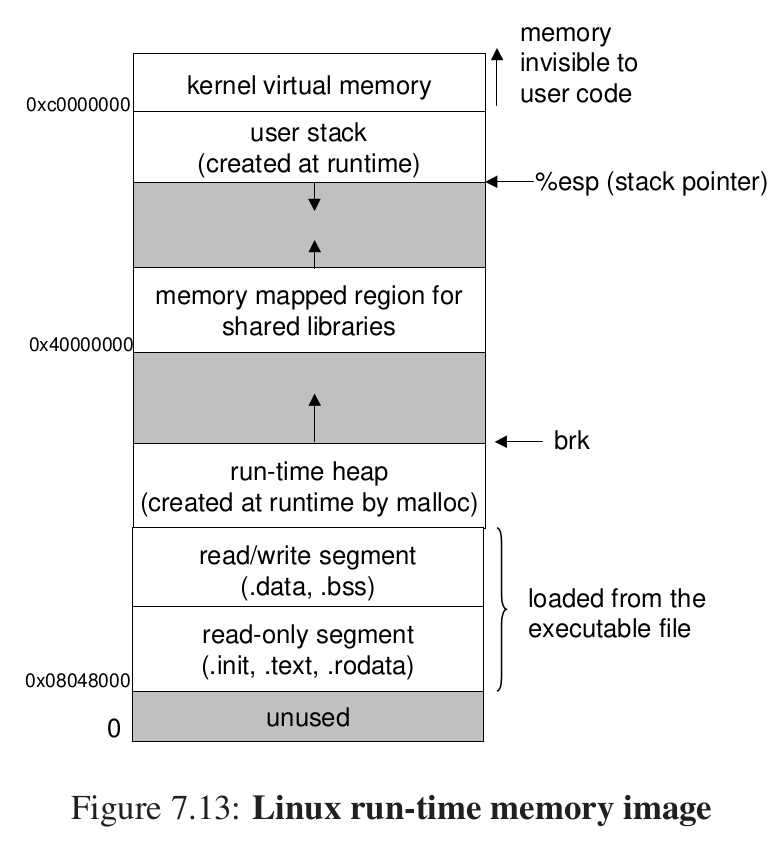
Our description of loading is conceptually right but not fully precise — intentionally so. To understand how loading really works, you need processes, virtual memory, and memory mapping, which we have not covered yet. When Chapters 8 and 9 introduce those ideas, we will return to loading and gradually lift the veil.
Lab: #
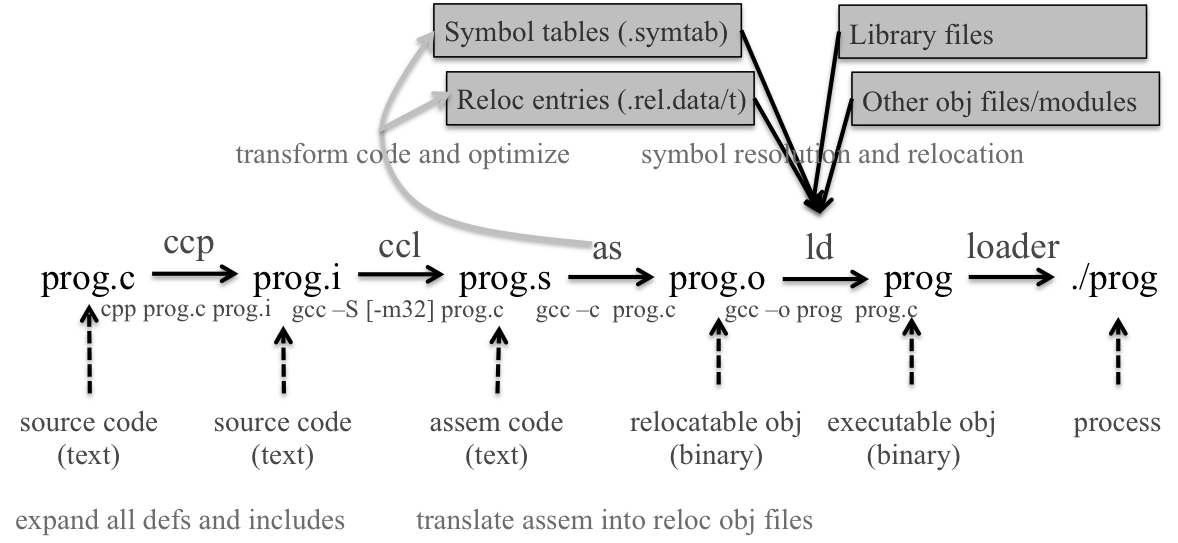
This lab imitates ld: write a static linker similar to Linux’s ld.
Simple C++ is enough.
Why a linker: it provides the inter-module referencing interface (extern) that modular source code needs.
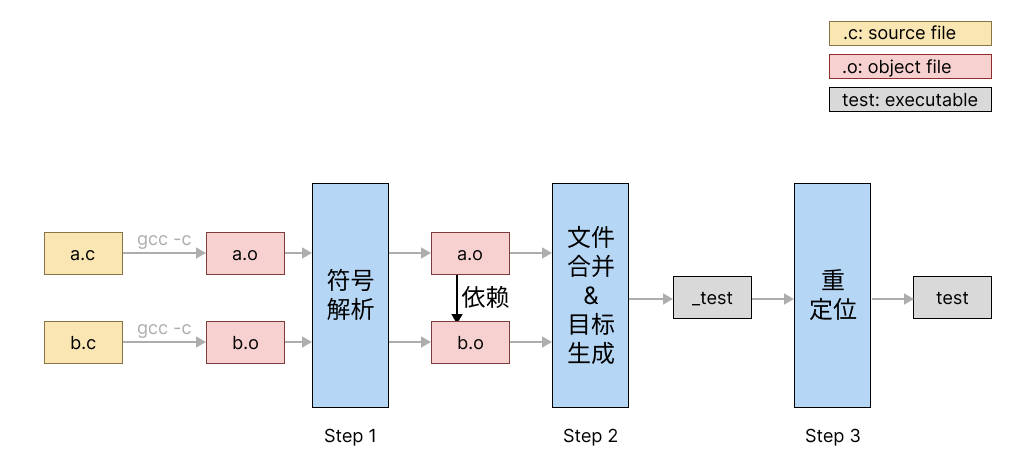
-
Symbol resolution: for each external reference, find the matching definition.
-
Merge into one executable.
-
Relocation: patch the executable so references point to the correct places.
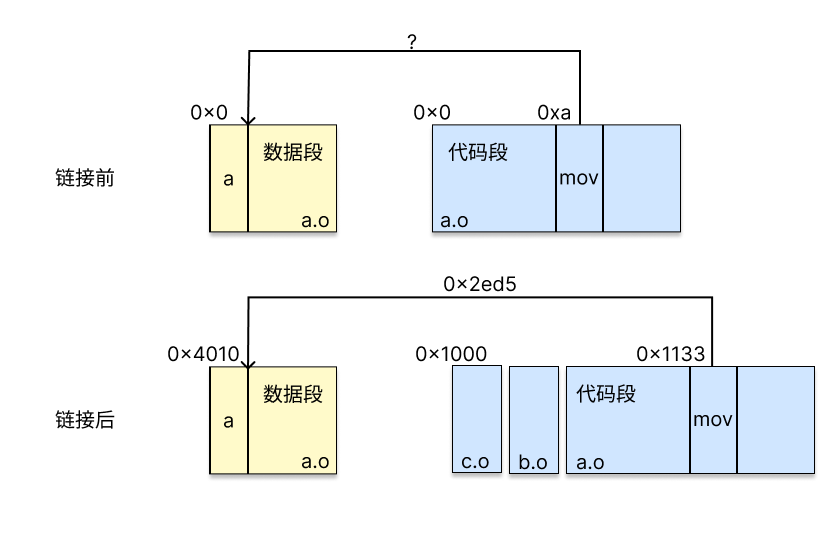
The CPU uses PC-relative addressing for these references.
Relocation fills those placeholder slots with addresses after merging.
Lab framework:
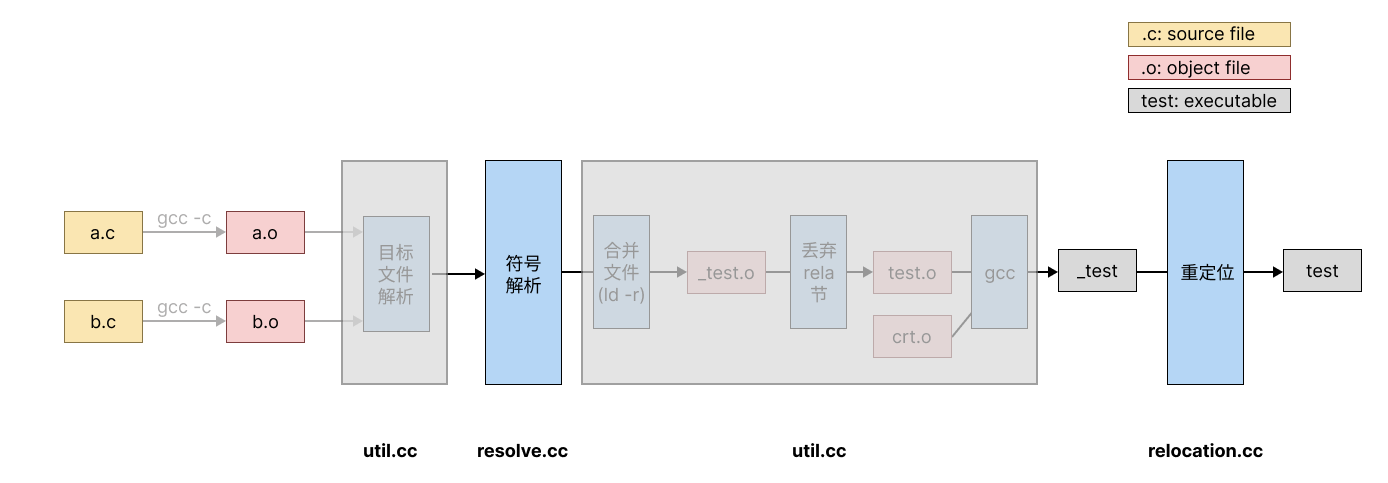
We implement the two key stages: resolution and relocation.
Key data structures:
ObjectFile #
Stores information needed from an object file. Members:
- symbolTable: the object’s symbol table (see Symbol below)
- relocTable: the object’s relocation table (see RelocEntry below)
- sections: section map from name string to Section
- sectionsByIdx: section map from index to
Section* - baseAddr: base address of the object in memory; see test0
- size: object file size
Section #
Stores one section. Members:
- name: section name
- type: section type (omitted in this lab)
- flags: section flags (omitted in this lab)
- info: extra section info (omitted in this lab)
- index: section index
- addr: section start address
- off: offset of the section in the object file
- size: section size
- align: alignment constraint in the object file
For details on type and flags, see the [ELF man page section on Shdr](https://www.man7.org/linux/man-pages/man5/elf.5.html#:~:text=Section header (Shdr)).
Symbol #
Stores one symbol. Members:
- name: symbol name (
string) - value: symbol value — offset within its section
- size: symbol size; 0 if undefined
- type: e.g., variable vs function
- bind: e.g., global vs local
- visibility: omitted in this lab
- offset: offset of the symbol in the object file
- index: section-header index of the related section
RelocEntry #
Stores one relocation entry produced by a reference. Members:
- sym: pointer to the associated
Symbol - name: associated symbol name (
string) - offset: offset of the reloc site within the section
- type: relocation type
- addend: constant addend used when computing the value stored in the relocatable field
allObject #
Stores the ObjectFile for every input object.
mergedObject #
The ObjectFile after all objects are merged.
For absolute relocation (e.g. R_X86_64_64):
result = symbol_address + addend
For PC-relative relocation (e.g. R_X86_64_PC32):
result = symbol_address + addend − current_address
Think: why is
addend0 forR_X86_64_32but not forR_X86_64_PC32? What doesaddendmean in practice?
The former is an absolute address we obtain directly; the latter is PC-relative — call uses an offset from the current PC, which is also useful when indexing into an array.
Relocation Logic: #
Relocation means using the relocation table to patch placeholder symbols (
0000) in the executable object file.
#include "relocation.h"

#include <sys/mman.h>

// test0和test1都只需要进行重定位即可
// 重定位是加载这个程序之前我要修改值
void handleRela(std::vector<ObjectFile> &allObject, ObjectFile &mergedObject, bool isPIE)
{
    /* When there is more than 1 objects,
     * you need to adjust the offset of each RelocEntry
     */
    // 合并之后,我们要更改偏移量,在大于1的情况下
    if (allObject.size() > 1)
    {
        // 每次sum都要加上一整个节大小的偏移
        uint64_t sum = 0;
        for (auto &object : allObject)
        {
            for (auto &rel : object.relocTable)
            {
                rel.offset += sum;
            }
            sum += object.sections[".text"].size;
        }
    }

    /* in PIE executables, user code starts at 0xe9 by .text section */
    /* in non-PIE executables, user code starts at 0xe6 by .text section */
    // 注意 textOff 和 textAddr 的区别:textOff 是指 .text 节在 ELF 文件中存储的位置,而 textAddr 是指 .text 节被运行时加载后在内存中所处的位置。
    // 这里都是mergeObject的位置
    uint64_t userCodeStart = isPIE ? 0xe9 : 0xe6;
    uint64_t textOff = mergedObject.sections[".text"].off + userCodeStart;
    uint64_t textAddr = mergedObject.sections[".text"].addr + userCodeStart;

    for (auto &object : allObject)
    {
        for (auto &rel : object.relocTable)
        {

            // 直接转换
            uint64_t baseAddr = reinterpret_cast<uint64_t>(mergedObject.baseAddr);

            // 查看重定位的类型
            // 相对寻址
            if (rel.type == R_X86_64_PLT32 || rel.type == R_X86_64_PC32)
            {
                // 填入目标指令地址和当前PC的差值 + 补偿量
                int val = rel.sym->value - (textAddr + rel.offset) + rel.addend;
                // 注意这里的地址是32位的地址
                *reinterpret_cast<int *>(baseAddr + textOff + rel.offset) = val;
            }
            // 这是绝对地址
            else if (rel.type == R_X86_64_32)
            {
                int val = rel.sym->value + rel.addend;
                *reinterpret_cast<int *>(baseAddr + textOff + rel.offset) = val;
            }
            else
            {
                fprintf(stderr, "There is something wrong...\n");
            }
        }
    }
}
Symbol-Resolution Logic: #
Similar to how we discussed loading libraries earlier — we maintain sets.
After looking at others’ code, and to reduce plagiarism risk, some of my parts are written more abstractly.
#include "resolve.h"

#include <iostream>

#define FOUND_ALL_DEF 0
#define MULTI_DEF 1
#define NO_DEF 2

std::string errSymName;

int callResolveSymbols(std::vector<ObjectFile> &allObjects);

void resolveSymbols(std::vector<ObjectFile> &allObjects)
{
    int ret = callResolveSymbols(allObjects);
    if (ret == MULTI_DEF)
    {
        std::cerr << "multiple definition for symbol " << errSymName << std::endl;
        abort();
    }
    else if (ret == NO_DEF)
    {
        std::cerr << "undefined reference for symbol " << errSymName << std::endl;
        abort();
    }
}

/* bind each undefined reference (reloc entry) to the exact valid symbol table entry
 * Throw correct errors when a reference is not bound to definition,
 * or there is more than one definition.
 */

// 这里我们要做三件事情1.找未定义的符号2.多重定义3.把弱符号绑定到强符号上面去
int callResolveSymbols(std::vector<ObjectFile> &allObjects)
{

    // if found multiple definition, set the errSymName to problematic symbol name and return MULTIDEF;
    // if no definition is found, set the errSymName to problematic symbol name and return NODEF;
    // 维护两个集合,strong和weak
    // 前面是name,后面是对应的*symbol
    std::unordered_map<std::string, Symbol *> weakMap;
    std::unordered_map<std::string, Symbol *> strongMap;

    for (auto &object : allObjects)
    {
        // 遍历符号表
        for (auto &symbol : object.symbolTable)
        {
            // 找到了一个强符号
            if (symbol.index != SHN_UNDEF && symbol.index != SHN_COMMON && symbol.bind == STB_GLOBAL)
            {
                // 已经存在,表明多重定义
                if (strongMap.find(symbol.name) != strongMap.end())
                {
                    errSymName = symbol.name;
                    return MULTI_DEF;
                }
                else
                {
                    // 原来没有,直接绑定
                    strongMap.emplace(symbol.name, &symbol);
                }
            }
        }
    }

    // 把所有强符号绑定好了之后,再去处理弱符号
    for (auto &object : allObjects)
    {
        for (auto &symbol : object.symbolTable)
        {
            if (symbol.index == SHN_COMMON && symbol.bind == STB_GLOBAL)
            {
                // 不存在直接绑定
                if (weakMap.find(symbol.name) == weakMap.end())
                {
                    weakMap.emplace(symbol.name, &symbol);
                }
            }
        }
    }

    // 处理弱符号和强符号相同的情况
    for (auto it = weakMap.begin(); it != weakMap.end(); ++it)
    {
        if (strongMap.find(it->first) != strongMap.end())
        {
            it->second->value = strongMap[it->first]->value;
            it->second->index = strongMap[it->first]->index;
        }
    }

    // 遍历重定位符号表,哪些符号要重定位但是没有在map里,说明未定义的错误
    // 重定位的symbol在最后检查的时候被绑定
    for (auto &object : allObjects)
    {
        for (auto &rel : object.relocTable)
        {
            if (strongMap.find(rel.name) != strongMap.end())
            {
                rel.sym = strongMap[rel.name];
            }
            else if (weakMap.find(rel.name) != weakMap.end())
            {
                rel.sym = weakMap[rel.name];
            }
            else
            {
                errSymName = rel.name;
                return NO_DEF;
            }
        }
    }
    return FOUND_ALL_DEF;
}
In short, linking is a complex topic spanning many ideas — dynamic DLLs, library interposition, and more — to explore later.