Computer Organization #
[!NOTE]
Before this post, I had already built a very simple CPU (mostly digital-logic material, though it is also part of computer organization). Course notes and materials come from Bilibili: Cs Primer.
Here I only record some theoretical points that felt worth keeping; I will keep adding to this note.
Cache (Memory Hierarchy) #
-
DRAM, SRAM, SSD, and HDD — their read/write behavior and storage roles, and the gap between main memory and the CPU.
-
Program locality: programs tend to reference data items near recently referenced ones, or the same items again (e.g., iterating an array).
a. Spatial locality b. Temporal locality
Introduction:
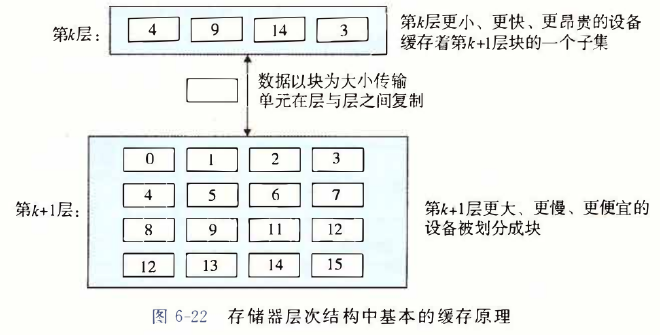
Cache Memory #
1. Structure #
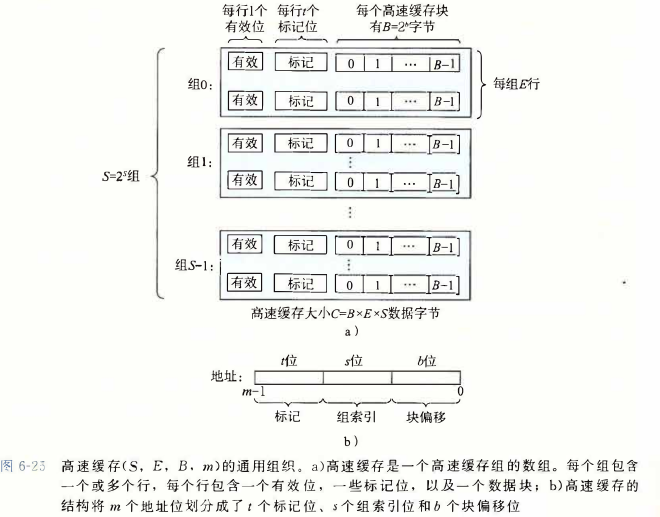
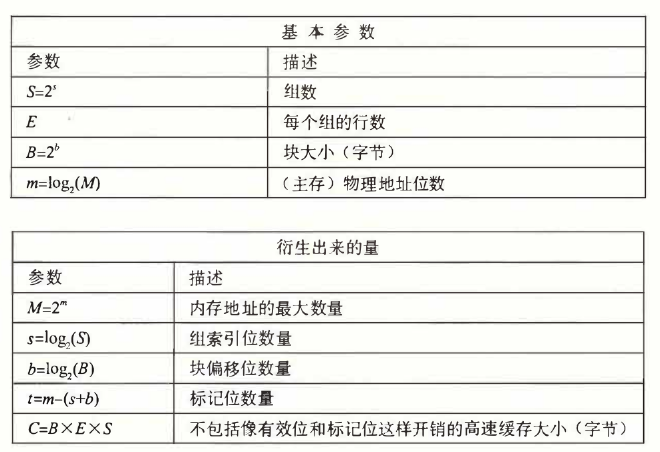
SBE is the total size.
Addressing principle: hash
2. Direct-Mapped Cache #
Each set contains only one line.
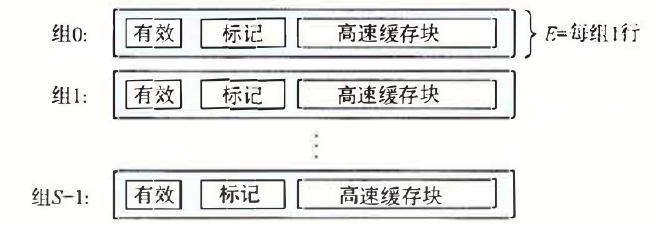
Process
a. Set selection
Why use the middle bits as the set index instead of the higher bits?
If high bits were used as the index, consecutive blocks would easily map into the same cache set, which hurts spatial locality.
Middle bits tend to have more randomness.
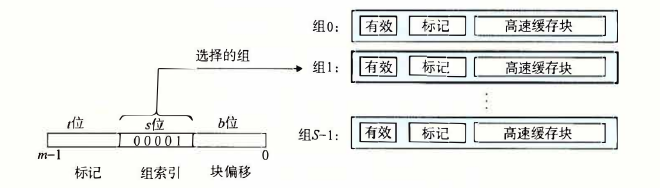
b. After finding the set, perform line matching
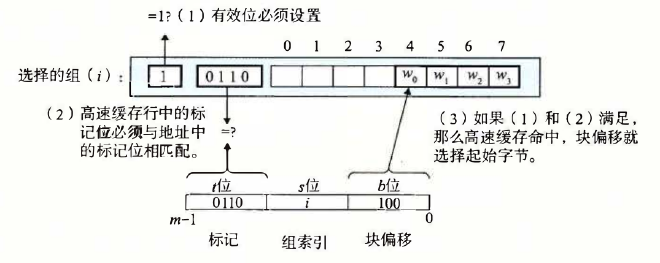
c. Use the block offset to locate the first byte
d. On a miss, fetch the corresponding block from the next level of memory and replace
e. In practice: the cache starts empty → cold miss → load data from L2 into L1 and return; later, if the tag mismatches → conflict miss → replace.
d. A common conflict-miss pattern: thrashing — the cache repeatedly loads and evicts the same sets.
3. Set-Associative Cache #
Each set contains more than one line.
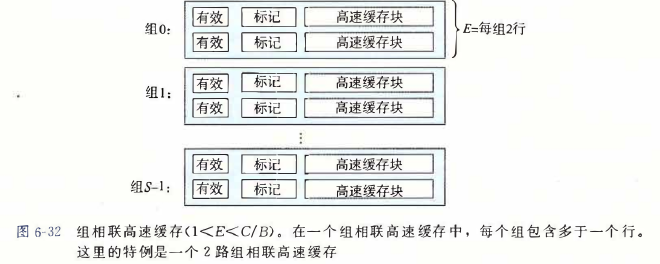
Match against each line in the set.
LFU and LRU policies
4. Fully Associative Cache #
There is only one set, containing many lines.
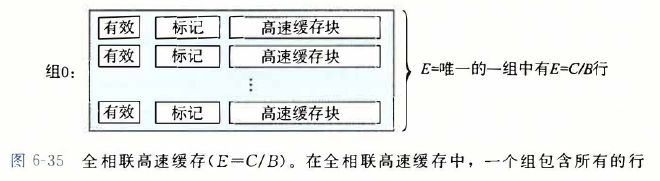
No set selection — only tag and block offset.
Single-Cycle vs Multi-Cycle Processors #
A single-cycle processor completes one instruction in one clock cycle.
A multi-cycle processor spreads one instruction across multiple clock cycles.
Pipelining #
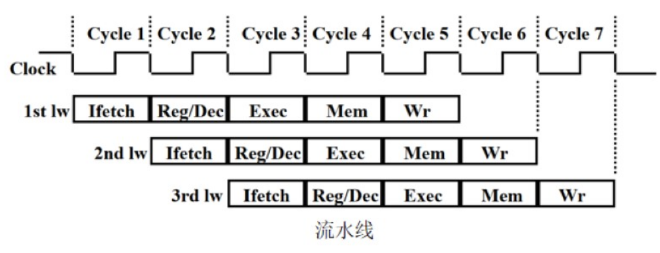
Five-Stage Pipeline #
Fill each instruction into five stages to avoid conflicts.
Pipeline Hazards #
Structural hazard: conflicts over hardware resources #
Data hazard: conflicts from logical data dependencies #
Control hazard: a branch to another instruction invalidates instructions already prepared in the pipeline #
Solution: branch prediction (dynamic)
Writing and Running Programs on x86 #
Processing a C Program #
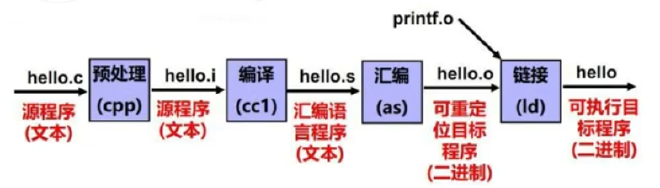
Preprocess → compile → assemble → link → load and execute
Suppose we have main.c and hello.c
gcc main.c hello.c //这一条指令包含了上述的四个步骤
gcc -E hello.c -o hello.i //这表示对于文件进行预处理 -o是指定名称(擦除并且进行复制粘贴的流程)
gcc -S hello.i -o hello.s //把预处理之后的文件处理成汇编代码
gcc -c hello.s -o hello.o //汇编成一个二进制文件,但是不进行链接的操作
Tools: readelf (inspect section offsets), objdump (disassemble), hexdump (inspect machine code in binaries)
gcc main.o hello.o //直接将两个文件进行链接,如下是链接的过程
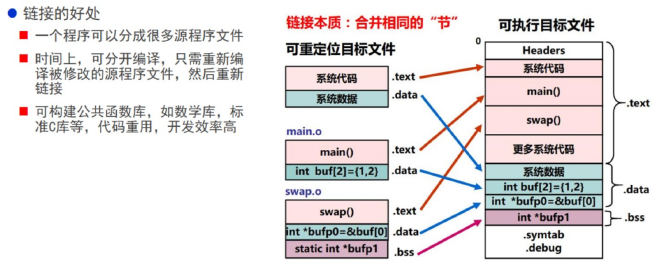
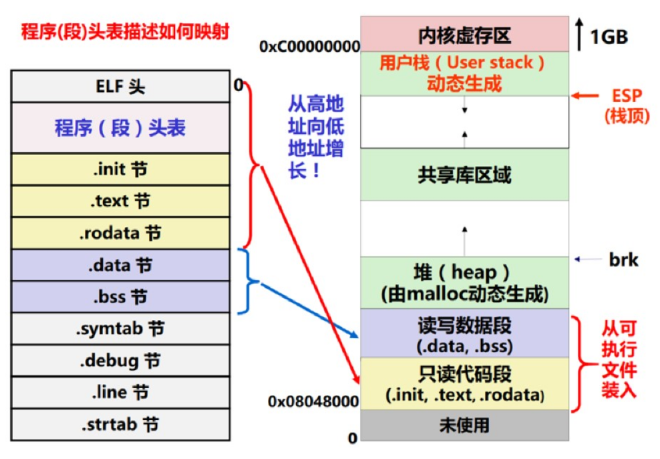
Then the load-and-execute flow:
Common x86 Assembly Instructions #
Refer to CSAPP for basic syntax — being able to read it is enough.
[!TIP]
Conditional jump instructions (the
jmpfamily) can be preceded by many other instructions.For example, after
subl a,byou can also branch based on the relation betweenaandb.
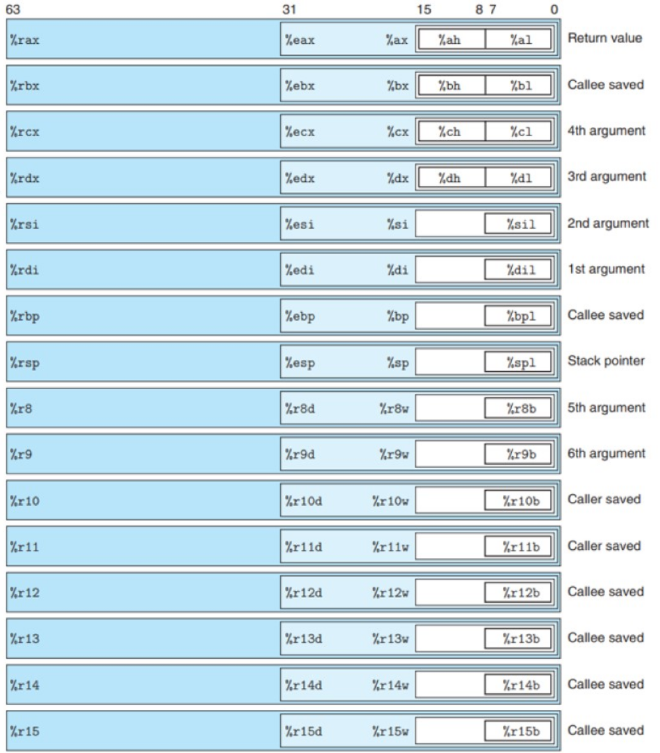
Registers Used in 64-bit Mode #
Data Movement Instructions #
move: cannot transfer directly from memory to memory
#
[!NOTE]
I have read the book several times, and the hardest part for me is still function calls and recursion. I suggest starting from
pushand working carefully from there.
push instruction: #
- Subtract 8 from the stack pointer to get the new top-of-stack location (still empty). 2. Place the source operand at the top of the stack. (
pushitself is just one byte of instruction; the stack simply holds data — it is not inherently tied to registers or memory beyond that.)
pop is the reverse: 1. Read the top-of-stack value into a destination register. 2. Add 8 to the stack pointer.
Conditional Control #
if, for, while, and similar constructs are implemented with conditional jumps.
For switch, when the case range is large it also uses conditional jumps; when the range is small (and there are many cases), it uses a jump table — a contiguous array whose domain covers all cases.
*Process (Procedures) #
Control + data passing + memory management
Runtime Stack (preparation) #
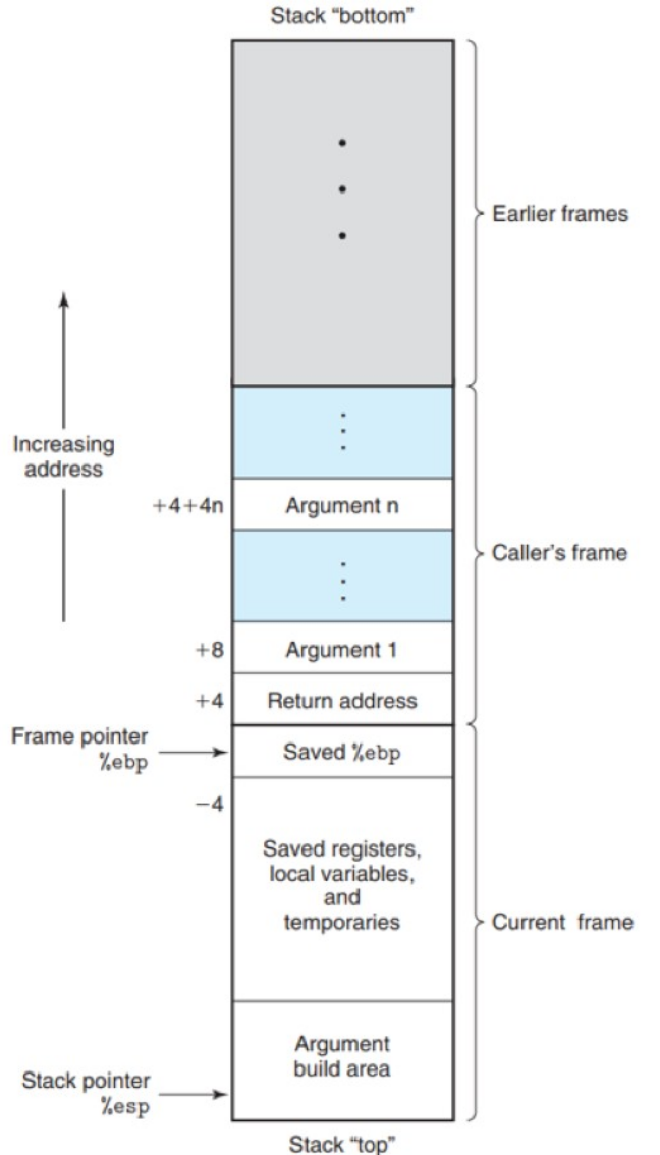
When P calls Q, it first stores the return address — where P should resume when Q returns. That address is also part of P’s stack frame.
Then a stack frame is allocated for Q. Most frames have fixed size. Arguments are passed in registers; if there are more than six, P stores the extras in its own frame before calling Q.
Transferring Control (handing off execution) #
call: set rip to the callee’s entry address, transferring control, and push the address of the next instruction after call onto the stack.
ret: pop that address and set rip to it, returning control.
Data Transfer (passing arguments to the callee) #
With fewer than six arguments, pass them in registers and take the return value in rax.
In the Current frame diagram above, there is an Argument build area. If this function will itself call another function with more than six arguments, it prepares those extras in its own frame before call (note: the 7th argument sits at the top of the stack).
Local Storage on the Stack (how callee locals work) #
Examples: too many locals, needing the address of a local, or locals that are arrays/structs.
Still referring to the figure above: above the argument-build area is the space obtained by decreasing the stack pointer for locals.
Example from CSAPP:
long swap_add (long *XP , long * yp)
{
long x = *xp ;
long y = * yp ;
*xp = y ;
*yp = x ;
return x + y ;
}

long caller ()
{
//要处理以下两个局部变量,我就要为他们产生地址。
long argl = 534 ;
long arg2 = 1057 ;
long sum = swap_add (&argl , &arg2) ;
long diff = argl - arg2 ;
return sum * diff;
}
Assembly:
long caller()
caller:
subq $16 , %rsp
movq $534 , (%rsp)
movq $1057 , 8(%rsp)
leaq 8(%rsp) , %rsi
movq %rsp , %rdi
call swap_add	;这里的细节:方法虽然已经返回(返回之后之前压入的返回地址就会被弹出),但是栈帧还在,所以分配的局部变量还在
movq (%rsp) , %rdx
subq 8(%rsp) ,%rdx
imulq %rdx , %rax
addq $16 , %rsp	;此时栈帧不存在,会被后来的data覆盖掉
ret
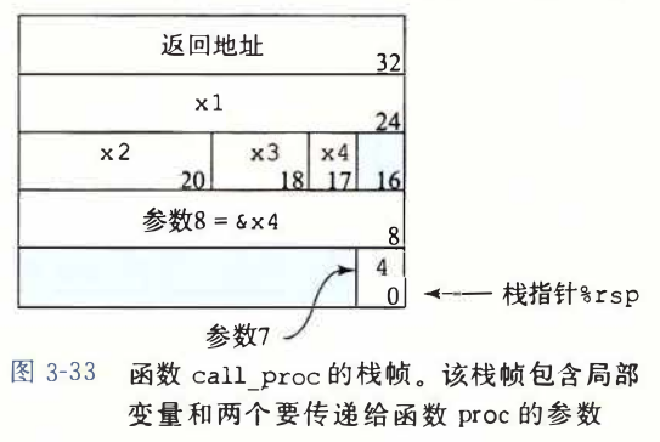
What is the allocated stack frame used for?
See the figure below:
Allocate a frame first for this function’s locals; then push arguments beyond the sixth from right to left; then call. Do not confuse locals with passed arguments — the callee does not use locals from the caller’s frame.
Local Storage in Registers #
🔹 What are these registers mainly used for? #
1. Storing local variables #
(This is another way to store locals — e.g., a loop index.)
If a function has local variables but not enough registers, the compiler may keep some in callee-saved registers to avoid frequent stack accesses (faster than stack-resident variables).
2. Keeping long-lived variables #
If a variable is used throughout the function’s lifetime rather than as temporary data, it may live in %rbx, %r12–%r15.
3. Maintaining the frame pointer (%rbp)
#
Modern compilers may omit the frame pointer (Frame Pointer Omission, FPO), but in debug builds %rbp still holds the current function’s stack base, helping unwind the call stack.
4. Passing values across function calls #
When a value must remain unchanged across multiple calls, it may go in a callee-saved register, for example:
- In recursive functions, some parameters may need to survive many recursive calls.
- In coroutines or context-switch code, some registers may hold task-specific state.
Recursion #
At this point, recursion is straightforward: calling yourself is like calling any other procedure — each invocation has its own private stack frame.
What makes recursion hard is when the contents of each frame become complex.
Array Allocation and Access #
-
Pointer access: use
leaqfor effective addresses,movto load values. -
Multidimensional arrays
-
Fixed- and variable-length arrays, and structs
Buffer Overflow #
C Language Basics #
Bit-manipulation tricks
Multi-line macros use \; wrap the body in do {......} while(0) to consume the trailing ; (a subtle detail).
Inline functions: similar to macros — the call site expands the body without a jump, saving overhead (compiler-dependent).
static inline int(...){......} //一般这样定义在头文件里使用
I will not elaborate further on C itself.
Floating-Point Numbers in Detail #
Floating-Point Representation #
(Floating radix point) base conversion (digital-logic material)
[!NOTE]
IEEE 754 — the classic of classics
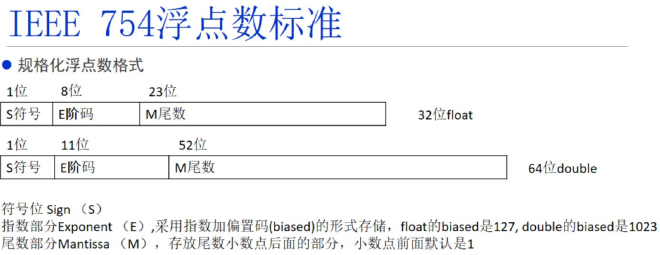
Here the significand (mantissa) is the binary fraction after the point:
e.g., 2.5 = 10.1b
i.e. $$ 2.5 = 1.01*2^1 $$
[!NOTE]
This is a normalized floating-point number. Normalization assumes a leading 1 (value ≥ 1 in the significand form), so we only store the fractional part in the 23-bit field. If the exponent field is 0 but the significand is nonzero, the number is denormalized; the computation rules change — the exponent becomes 1−bias — to provide a smooth transition toward zero.
Denormals and Rounding #
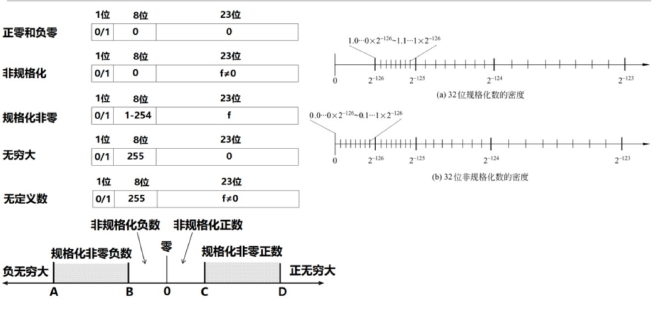
Rounding: round-to-nearest, ties to even (prefer 0 in the tie case as described in the source material)
Larger exponents mean lower density and thus lower precision.
Floating-Point Arithmetic #
Align exponents first, then add — this can cause large values to “eat” small ones.
Use an accumulation algorithm like the following:
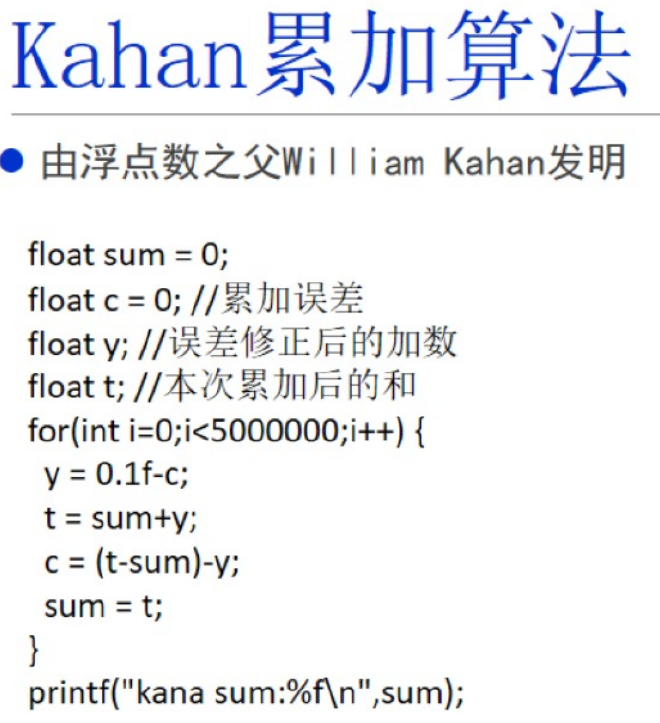
Comparison pitfall: 0.1 + 0.2 != 0.3 (from non-terminating binary fractions).
[!NOTE]
Another point worth noting is round-to-nearest-even (banker’s rounding) on type conversions, which helps reduce accumulated rounding error.
Homework #
At this stage, do the three CSAPP labs and work through the end-of-chapter exercises for CSAPP Ch. 2 and 3 (I skipped writing up Ch. 2; I only cover Ch. 3 here).
1. datalab
2. bomblab (gdb usage — quite hard; I suggest reading more, doing exercises, and understanding before diving in)
Common gdb commands (from https://arthals.ink/blog/bomb-lab as a reference blog)
p $rax  # 打印寄存器 rax 的值
p $rsp  # 打印栈指针的值
p/x $rsp  # 打印栈指针的值,以十六进制显示
p/d $rsp  # 打印栈指针的值,以十进制显示

x/2x $rsp  # 以十六进制格式查看栈指针 %rsp 指向的内存位置 M[%rsp] 开始的两个单位。
x/2d $rsp # 以十进制格式查看栈指针 %rsp 指向的内存位置 M[%rsp] 开始的两个单位。
x/2c $rsp # 以字符格式查看栈指针 %rsp 指向的内存位置 M[%rsp] 开始的两个单位。
x/s $rsp # 把栈指针指向的内存位置 M[%rsp] 当作 C 风格字符串来查看。

x/b $rsp # 检查栈指针指向的内存位置 M[%rsp] 开始的 1 字节。
x/h $rsp # 检查栈指针指向的内存位置 M[%rsp] 开始的 2 字节(半字)。
x/w $rsp # 检查栈指针指向的内存位置 M[%rsp] 开始的 4 字节(字)。
x/g $rsp # 检查栈指针指向的内存位置 M[%rsp] 开始的 8 字节(双字)。

info registers  # 打印所有寄存器的值
info breakpoints  # 打印所有断点的信息

delete breakpoints 1  # 删除第一个断点,可以简写为 d 1
3. attacklab (simulated attack)
[!NOTE]
The above takes a long time — haste makes waste. If you get stuck, look at recommended blogs on CSDIY.
Linking — A Brief Overview #
Static Linking #
Think of it as how multi-file programs are combined to run as one.
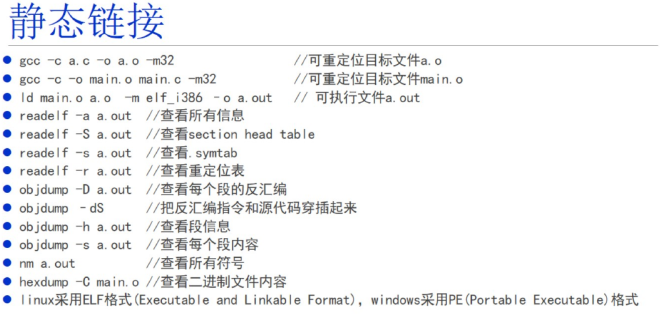
Analyzing Relocatable Object Files #
After assembling a single file, the .o is a relocatable object file.
(Using the two programs below)
readelf -a main.o	//分析elf文件内容

hexdump  -C main.o	//直接查看文件的二进制信息
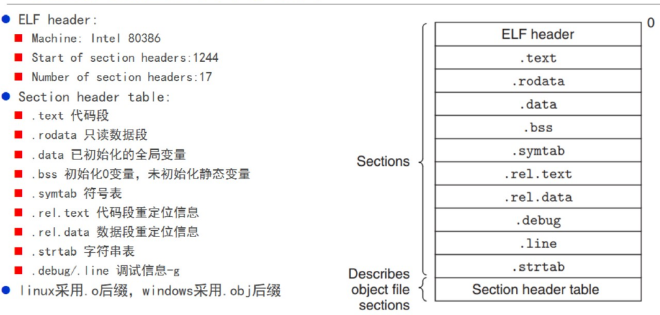
Symbol Table Information #
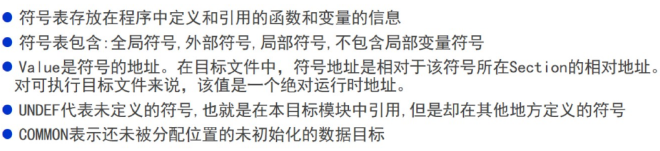
Weak and Strong Symbols #
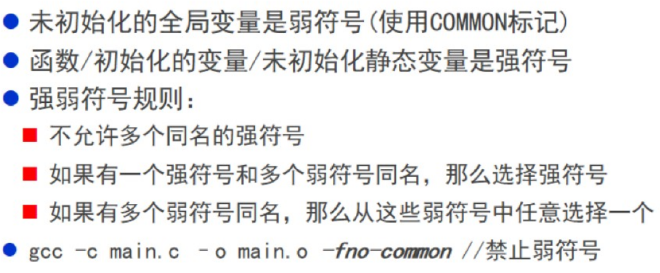
Executable Files #
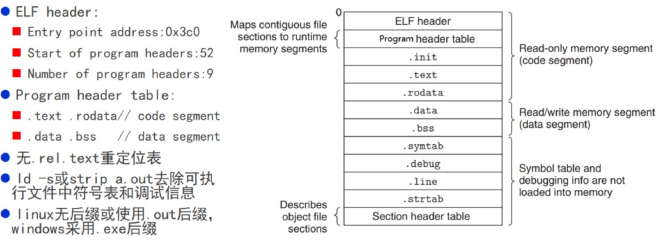
Inspect the Program Headers of an executable (how is it loaded and run?)
Program Headers:
  Type           Offset   VirtAddr   PhysAddr   FileSiz MemSiz  Flg Align
  LOAD           0x001020 0x00800020 0x00800020 0x00198 0x00198 R E 0x1000
  LOAD           0x002000 0x00801000 0x00801000 0x00038 0x00050 RW  0x1000
  GNU_STACK      0x000000 0x00000000 0x00000000 0x00000 0x00000 RW  0x10

 Section to Segment mapping:
  Segment Sections...
   00     .text .rodata
   01     .data .bss
   02
The Static Linking Process #
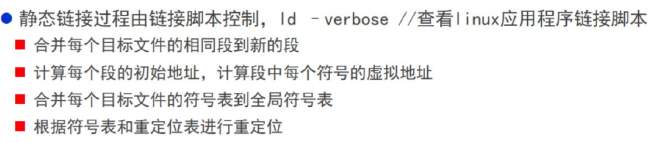
/* Simple linker script for os user-level programs.
   See the GNU ld 'info' manual ("info ld") to learn the syntax. */
//一个简单的linker脚本
OUTPUT_FORMAT("elf32-i386", "elf32-i386", "elf32-i386")	//输出格式
OUTPUT_ARCH(i386)	//架构类型
ENTRY(main)	//程序的入口点(main函数)

SECTIONS {
    /* Load programs at this address: "." means the current address */
    //在这个地址对程序进行加载
    . = 0x800020;

    //以下都是把每个目标文件中的相同的段合并到新的段
    .text : {
        *(.text .stub .text.* .gnu.linkonce.t.*)
    }

    PROVIDE(etext = .); /* Define the 'etext' symbol to this value */

    .rodata : {
        *(.rodata .rodata.* .gnu.linkonce.r.*)
    }

    /* Adjust the address for the data segment to the next page */
    //转页进行存储,以上的页就可以设置成ro的一个页
    . = ALIGN(0x1000);

    .data : {
        *(.data)
    }

    //记录下来,把.bss段设置成0
    PROVIDE(edata = .);

    .bss : {
        *(.bss)
    }

    PROVIDE(end = .);

    /DISCARD/ : {
        *(.eh_frame .note.GNU-stack .comment)
    }

}
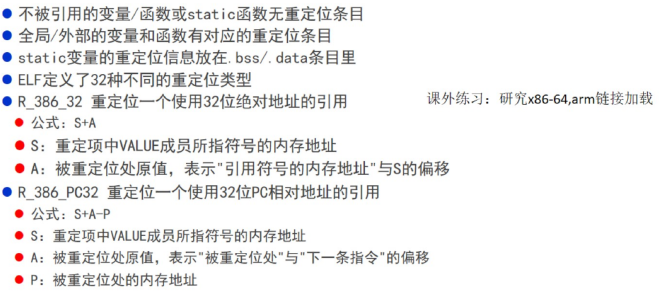
Relocation Information #